
Published monthly offers are a starting point
| Product and offer | Published amount | What must be checked next |
|---|---|---|
| HeyGen Creator | $29/month; 600 credits | Selected avatar model, translation and other usage |
| Creatify Starter | $39/month; 100 credits | Duration, feature and revision rules |
| MakeUGC Start up | $59/month; 500 credits | Feature access, model usage and recurring terms |
| Revid Hobby | $39/month | Current allowance and feature-specific usage |
| Arcads | $77 first month, then $110/month; reported onboarding | 1,000 credits displayed; reconcile account usage |
Public offers and the publisher-reported Arcads onboarding were checked September 20, 2026, excluding tax and annual equivalents. Arcads checkout was not independently reproduced. Credits are not comparable units between providers; promotions may differ from these baseline offers.
Start with a production brief that can be priced
Record the offer date and whether each amount is introductory, recurring or billed annually. A comparison that mixes those periods can reverse the apparent winner before any production work begins. Keep the renewal amount visible beside the first charge when approving a continuing subscription.
Write down what you need to deliver in a normal month. Include the number of distinct concepts, presenter segments, approximate durations and final formats. State which footage already exists. A business with its own product demonstration needs a different purchase from one that needs every visual created from scratch.
Separate first drafts from approved exports. If the plan is to publish four ads, you may need more than four generations. Some material will need a correction or a different take. The initial estimate should make room for ordinary production rather than assuming every first attempt is usable.
Describe the finishing requirements as well: captions, product shots, a closing offer and another aspect ratio. If those tasks require a second subscription or an editor’s time, include them in the comparison. The lowest generator price may not be the lowest cost for the complete deliverable.
Keep the brief modest enough to evaluate. One representative ad with a realistic correction can reveal more than a speculative calculation for hundreds of videos. Use the pilot to refine the workload before committing to a larger plan or annual payment.
HeyGen: a low entry amount still needs a model-specific calculation
HeyGen lists Creator at $29 per month with 600 credits. Its usage documentation assigns different rates to avatar models and other features. The selected model therefore changes how much of the allowance a particular clip consumes.
For illustration, the published Avatar IV photo rate is sixteen credits per minute, Avatar IV video is thirty-one and Avatar V is forty-eight. A thirty-second duration gives nominal usage of eight, fifteen and a half, or twenty-four credits respectively before any additional operation or billing detail. Check the account’s actual usage display rather than assuming a fractional estimate is the final charge.
Allocating the full $29 subscription evenly across 600 credits gives about 4.83 cents per credit. Multiplying that allocation by the example usage gives roughly $0.39, $0.75 and $1.16. These are nominal subscription allocations, not prices at which you can purchase individual finished ads. They assume the allowance is used and exclude corrections, extra features and labor.
This distinction matters for a small business producing only a few videos. If much of the allowance goes unused, the effective subscription cost per delivered asset is higher. Choose based on the workflow and the amount you will actually use, not the smallest theoretical unit cost.
Creatify: duration boundaries and revisions change the estimate
Creatify lists Starter at $39 per month with 100 credits. Its usage guide prices standard video ads and avatar generation at five credits per started fifteen seconds. A thirty-second example uses ten credits; a thirty-one-second example crosses into another interval and uses fifteen.
At an even allocation of the $39 subscription over 100 credits, those examples represent $3.90 and $5.85 of subscription capacity. Again, this is arithmetic for the specified standard feature, not a checkout price or a promise of an approved ad. Agent workflows and other generation modes have different usage behavior.
Revisions also need attention. The documented free-revision conditions on eligible plans do not mean every change is free: changing the script, avatar or voice can matter. Include the kind of correction your business normally requests in the pilot.
Do not compare the nominal Creatify example directly with a HeyGen avatar segment as if the outputs were identical. One workflow may include more assembly or use different source material. The useful comparison is the same complete brief, with all remaining work counted.
MakeUGC: distinguish the recurring plan from the promotion
MakeUGC’s public pricing lists Start up at $59 with 500 credits, Growth at $79 with 1,000 and a Pro recurring offer at $149 with 2,000. The page also presents introductory and model-specific promotional terms. Read the recurring charge and the required feature together.
A prominent introductory price is not a normal monthly budget. Likewise, an unlimited promotion for particular models does not establish unlimited access to every generation feature. Identify the exact workflow you intend to use and confirm which allowance or condition applies.
Avoid converting the credit balance into a fixed number of ads without a verified feature rate. A product-in-hand clip and a simpler talking segment may not consume the same amount. If the public material does not resolve your workload, ask for a concrete example using your intended duration and mode.
The page also has API offers. Treat them separately from the website subscription unless the provider explicitly confirms shared usage. A small business using the app should not build its budget from an API credit headline that describes a different product.
Revid and Arcads: keep uncertainty visible
Revid’s pricing page lists a Hobby offer at $39 and also displays other tiers and promotions. Its source-to-video workflow is different from a pure avatar segment. Check the current feature and credit rules for the media, voice and editing process you intend to use.
Arcads onboarding reported by the publisher showed $77 for the first month, then $110/month after a three-day trial. That offer displayed 1,000 credits and “Full access.” It differs from the larger allowances in the help-center article reviewed earlier, so use the offer’s own usage display before predicting capacity.
Keep the Arcads introduction and renewal separate in the budget. The $33 first-month discount is a one-time reduction in this offer, while $110 is the ongoing monthly baseline. Reconcile the included balance and generation charges before comparing its accepted-output cost.
A known subscription amount still does not establish the cost of a completed job. The trial needs to answer how many attempts the brief takes and whether the output is usable. Keep those production assumptions separate from the now-observed monthly price.
Use a cost ledger instead of a price-per-video slogan
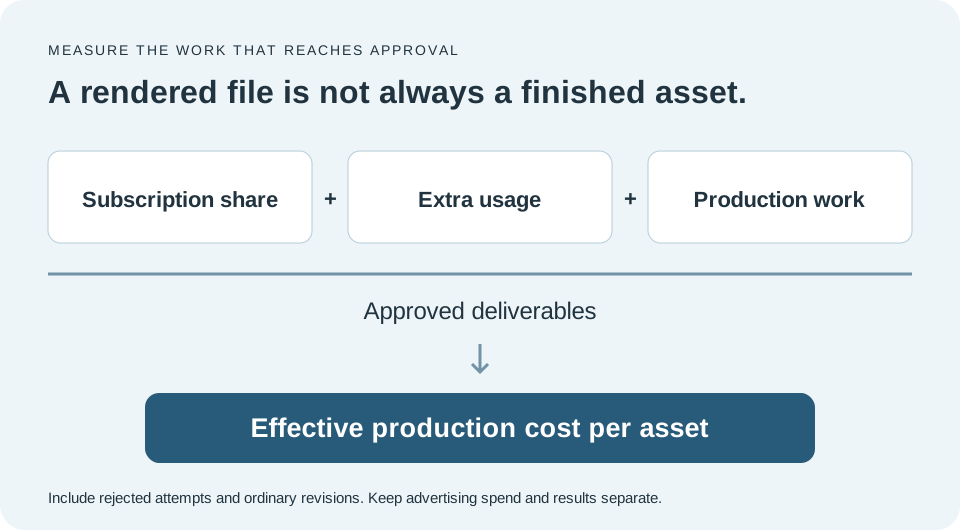
A useful ledger has separate rows for subscription, additional usage, editing, review and any source production. Assign each expense to the defined workload. Keep advertising spend separate so the cost of creating an asset is not confused with the cost of distributing it.
Count accepted deliverables at the end of the process. If a hypothetical month costs $120 in software and production effort and yields six approved ads, the effective production cost is $20 per approved ad. If only three are usable, it is $40. These are illustrative numbers, not vendor benchmarks.
Also record why material was rejected. A weak brief, inaccurate product visual and poor pronunciation require different fixes. The cheapest way to improve the next batch may be a clearer script or better source footage rather than another subscription.
Avoid false precision. Small pilot samples are useful for identifying work but do not establish a permanent acceptance rate. Keep a range for planning and update it with actual recurring use. The goal is a budget you can manage, not a deceptively exact forecast.
A small-business production cost worksheet
| Line item | What to record |
|---|---|
| Recurring subscription | Actual billing amount and period |
| Additional usage | Top-ups, overage or a required upgrade |
| Source production | Filming or assets needed for this brief |
| Finishing and review | Editing and approval time |
| Approved deliverables | Files ready for the intended campaign |
| Effective cost | Relevant production cost divided by approved deliverables |
The $120 examples are illustrative arithmetic. They do not estimate any named provider’s acceptance rate or your campaign results.
Compare monthly billing with annual commitment honestly
An annual plan may display a monthly equivalent while charging for the year. Record both the equivalent and the cash due. A lower headline amount is not the same purchasing decision as a cancellable monthly subscription.
Use monthly evaluation when you still need to establish workflow fit, if the provider offers it on acceptable terms. Once the product handles recurring work reliably, compare the annual saving with the commitment. Do not buy a year solely because the theoretical credit value looks attractive.
Check how usage is allocated over the year. Some plans deliver credits monthly even when paid annually; others use different rules. A yearly payment does not automatically mean the entire year’s capacity is available for one large campaign.
Read the current cancellation, refund and unused-credit conditions before budgeting a short project. These terms vary by provider and plan. Keep the confirmation with the purchase record so a later decision is based on the offer you actually accepted.
Choose the smallest plan that covers the necessary feature
Capacity is only one reason to upgrade. A required feature, resolution or team workflow may sit on a higher tier even when the smaller allowance would be sufficient. List those requirements before comparing plan prices so you do not budget for an offer that cannot produce the deliverable.
At the same time, avoid paying for features that do not solve a current problem. A solo operator making a few simple clips may not need a complex team setup. Add capacity or collaboration when the actual workload justifies it.
Account for unused software you already own. An existing editor may handle captions and final assembly, allowing the new purchase to focus on generation. Conversely, moving everything into a single product may save handoff time if the finishing tools meet the brief.
Set a review point after the first production cycle. Compare expected and actual usage, corrections and output. If the subscription is mostly idle, reconsider the plan or production cadence. If the same missing feature causes repeated work, investigate the upgrade with that specific evidence.
What a sensible first-month purchase looks like
Choose one campaign problem and one candidate workflow. Prepare the script, product references and destination before starting the paid evaluation. A subscription clock should not be used mainly to discover that the team has not agreed on the message.
Produce a representative asset, complete a correction and export the required formats. Record the usage and the work done outside the tool. This establishes whether the product fits the business more reliably than browsing dozens of sample avatars.
Keep enough allowance for the normal revision. Do not spend the whole first month generating cosmetic variants before one complete ad has been approved. A small successful workflow gives you a better basis for the next purchase than a large folder of unfinished clips.
At the end, decide whether to continue, change the plan or use another production method. The decision should reflect accepted work and recurring needs. A discounted subscription is still wasteful if the business does not use its output.
Common pricing questions
Which tool is cheapest? The lowest published entry amount in this shortlist is not automatically the lowest complete production cost. Define the feature, duration and finishing work first. A model-specific calculation is more useful than a universal cheapest label.
Are credits interchangeable? No. Providers assign different units and rates to different operations. Compare the same deliverable using each provider’s own rules rather than treating a larger balance as more capacity.
Does unlimited mean no limits? Read the scope of the offer. It may apply to certain models, queues or features while other operations remain metered. Keep the exact terms with the purchasing decision.
Should you include your own time? For an internal business decision, it is useful to track it even if you do not assign a precise dollar rate. A tool that saves subscription spend but consumes much more of your working day may not be the better purchase.
Separate a quiet month from an inefficient workflow
A high effective cost per asset can have different causes. The business may simply have needed fewer videos that month, leaving capacity unused. Alternatively, it may have spent the allowance on attempts that never became useful. Those situations call for different decisions.
Low demand may justify a smaller plan or a different billing arrangement. A low acceptance rate calls for reviewing the brief, source material and generation mode. Buying more capacity without identifying the cause can increase spend without solving the production problem.
Keep a simple record of planned assets, attempted assets and approved assets. Add the reason for any large gap. Over several cycles, that record can show whether the subscription is mismatched to the business cadence or whether a specific production step needs attention.
Use this evidence when evaluating an annual discount. A lower nominal rate is less persuasive if the business has not yet established a recurring need for the allowance.
What we would do
Compare the actual monthly offer, the required feature and the work needed to finish an approved ad. Use a small pilot to measure usage and corrections, keep annual commitments separate from monthly prices, and leave unverified amounts visibly unknown.
Sources & methodology
We reviewed public vendor pages and search results on . We did not run paid hands-on tests or measure ad performance. “Verified” means supported by a linked official source, not independently tested. “Calculated” means arithmetic with stated assumptions. “Reported” means information supplied by the publisher or a third party, with its provenance stated in the article. “Unknown” means not established in this review. “Editorial” identifies our analysis.
- HeyGen: official pricing information ↗
- Creatify: official pricing information ↗
- MakeUGC: official pricing information ↗
- Revid: official pricing information ↗
- Arcads: official product information ↗
- HeyGen: credit rates ↗
- Creatify: usage and revision rules ↗
- MakeUGC: current offers ↗
- Revid: current pricing ↗
- Arcads: allowances and additional credits ↗
Prices are in USD where shown. Confirm billing period, applicable tax, promotions, feature access and usage rules at checkout. Research dates are fixed to this review, not automatically refreshed on deployment.