
Three kinds of reuse to distinguish
| Capability | What it preserves | What to verify |
|---|---|---|
| Brand kit | Fonts, colors, logos and other reusable assets | Availability and workspace access |
| Custom project template | Scene layout, timing and editable placeholders | Replacement behavior and eligible plan |
| Generation workflow | Inputs and production steps for creating material | Model choices, usage costs and output review |
| Public template library | A prebuilt starting design | Whether your customized version can be saved |
A public template gallery does not prove that a subscription allows saving your own templates. Reuse does not imply locked layers or automatic approval.
Start with the recurring edit you want to eliminate
Name the replaceable fields in plain language: current offer, product footage and opening claim. A teammate should be able to identify them without remembering how the original campaign was built. Review the populated copy rather than assuming that reusing an approved layout approves the new message.
A useful template removes repeated layout decisions. It does not remove the need to decide what the video should say. Before comparing tools, identify the work you repeat: setting caption styles, positioning product footage, building a closing card or assembling the same sequence of scenes. These are better requirements than simply asking for a large template library.
Take three recent videos from the same series and mark what stayed constant. Perhaps the opening question changes every time, but the demonstration frame and caption treatment remain stable. Those stable elements belong in the template. The product claim, price and destination usually need explicit replacement fields rather than being treated as permanent design.
A template can be too rigid. If every clip must fit the same exact duration, the editor may cut useful evidence or stretch weak material to fill a slot. Preserve a recognizable structure while allowing the demonstration to take the time it needs. The aim is a repeatable production process that still communicates clearly.
Write one sentence describing the intended use, such as “a creator answers one product objection and demonstrates the relevant feature.” This helps the next editor choose the right template and prevents a growing library of attractive layouts with unclear purposes.
Kapwing: evaluate Brand Templates and media replacement
Kapwing documents creating Brand Templates from a blank project or an existing project, with placeholders for replacement media. Its Brand Kit also stores reusable visual and language assets. These are relevant capabilities for a team that repeatedly edits footage into a familiar format.
Test the replacement operation with material that differs from the original. Use a portrait clip after a landscape source, a longer headline and a product image with a different shape. Check the crop, timing and caption placement. A template that works only with its original sample has not yet proved useful for your production.
Confirm access under the plan and workspace you intend to use. Have a second editor locate the template and make a new project from it. Check whether they can identify the fields that need changing without being coached through every scene. Ease of reuse includes how clearly the template communicates its own instructions.
VEED: distinguish custom templates from the public gallery
VEED’s help page explicitly distinguishes custom templates saved from your own projects from ready-made dashboard templates. It currently lists custom templates for Studio and Enterprise plans. That entitlement matters if saving a branded layout is the main reason you are purchasing the tool.
The documented custom template preserves layout elements such as logos, fonts, colors, captions and timing, and is available within the workspace. Test a new project using your actual footage and copy. Do not assume that a shared template automatically prevents someone from changing an element that should remain consistent.
Review how template updates fit your production process. Keep a clear distinction between improving the reusable master and editing one campaign project. A change to the library should be deliberate, with a note explaining what changed and when new work should use it.
Arcads workflows solve a different reuse problem
Arcads documents node-based workflows that connect inputs, models and tools. That is a way to reuse production steps for generated material. It should not be confused with a timeline template that preserves a finished ad’s layout and editable text layers.
A generation workflow may help create a set of actor-led openings or product-related clips that will later enter an editing template. Evaluate those stages separately. First check whether the generated segment communicates the approved script; then check whether it fits the final edit without awkward cuts or duplicated captions.
Keep the variable inputs visible. The actor, script, product reference and model settings can materially change the output and its cost. A reusable process is valuable when the next operator knows which inputs to change and which assumptions need another review.
Start with one accepted output before increasing the batch size. A repeatable workflow can repeat a mistake just as efficiently as it repeats a successful setup. Save the settings and source material that produced an approved example so future revisions begin from a known point.
Design fixed and variable fields deliberately
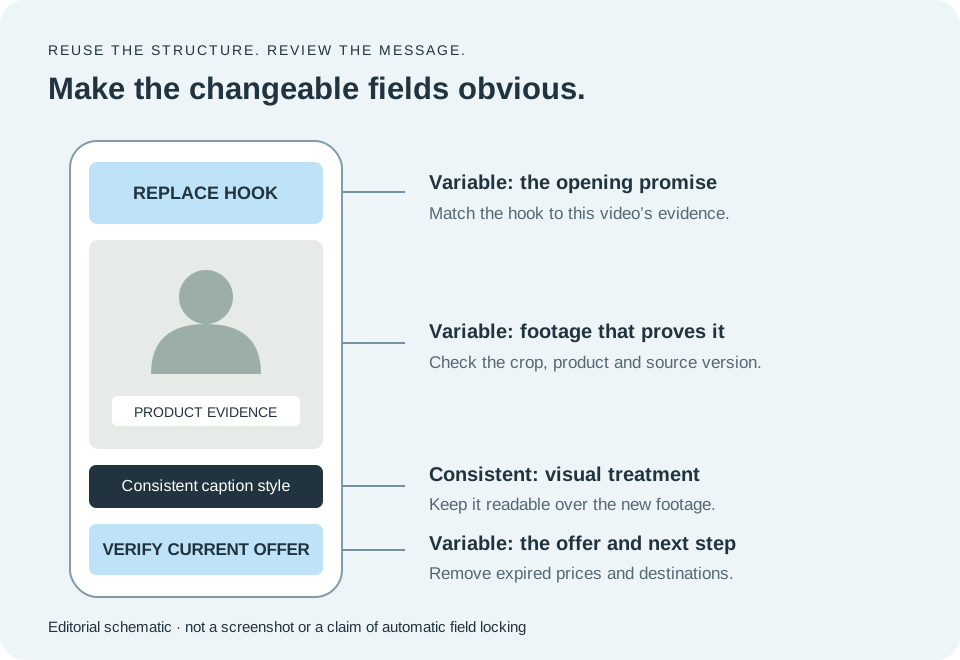
Fixed fields are the elements that should remain consistent across the series: a caption style, a logo treatment or the position of a supporting label. Variable fields include the hook, footage, product name, offer and closing action. Mark them clearly in the project and in a short instruction note.
Use descriptive placeholders rather than plausible sample copy. “Replace with current offer” is safer than leaving last month’s discount in an otherwise finished closing card. A realistic sample can look approved to an editor working quickly. The template should make unfinished work conspicuous.
Some fields are conditional. A demonstration may need a feature label, while an objection response may need a short question at the top. Explain when an element should be removed instead of forcing every video to contain it. Empty decorative boxes are not useful consistency.
Do not assume a tool supports locked layers, restricted fields or role-based template controls unless you verify them. If those controls matter, include them in the purchasing test. Otherwise use a clear master-copy convention and a final review to protect the intended layout.
A practical template field map
| Element | Default treatment | Review question |
|---|---|---|
| Caption font and contrast | Fixed style | Readable over this footage? |
| Opening hook | Replace every project | Does it match the actual proof? |
| Product shot | Replace or confirm | Correct product and version? |
| Price or offer | Replace and verify | Still valid for this destination? |
| Logo position | Consistent, with adjustment if needed | Does it cover important action? |
| Closing action | Campaign-specific | Matches the intended next step? |
Suggested editorial controls, not a claim that every tool enforces these fields automatically.
Template one: question, demonstration and answer
This format is useful when customers repeatedly ask how a feature works. Open with a specific question, show the action that answers it and finish with the practical result. The creator’s introduction can be brief because the demonstration carries the substance.
Build a place for the question, a flexible demonstration area and an optional closing line. Keep the caption position away from the action. If the video shows an interface, make sure the important control is large enough to see in the final format.
The variable part is the evidence. Do not swap only the headline while leaving a demonstration that answers a different question. Before approving the export, read the question and watch the action without listening to the narration. The visual sequence should still support the answer.
Template two: objection and supporting evidence
An objection-handling template starts with a genuine concern, gives a direct response and shows the evidence that supports it. For example, a software ad might address setup effort by showing the required steps. The template should help organize the argument, not manufacture a customer testimonial.
Leave space for a short qualification when the answer depends on a condition. If a feature is available only on a particular plan, that condition should remain understandable. Removing it to fit a preset line length can change the claim.
Avoid making the opening more dramatic than the response can support. A narrow, credible answer is more useful than a broad promise followed by unrelated product footage. Keep the objection, response and demonstration together when the template is handed to another editor.
Template three: product detail and use case
This format works when a specific product detail is easier to show than explain. Begin with the detail, demonstrate its use and connect it to a relevant situation. The presenter may frame the point, but the product should remain visible long enough for the viewer to understand it.
Create a flexible area for close-up footage and a short supporting label. Use the label to clarify the feature rather than repeat every spoken word. If the source footage changes shape or orientation, adjust the crop to preserve the detail instead of simply filling the frame.
The template should not imply that an AI presenter personally used the product. Write the script around observable features or the brand’s explanation. When the campaign depends on a real user’s experience, use an actual account and the corresponding approved footage.
Stress-test the template before distributing it
Use a small set of deliberately awkward inputs: a long product name, a two-line hook, a short clip, a different aspect ratio and a bright background behind captions. These are ordinary production conditions, not edge cases invented to make a tool fail. They reveal whether the layout will create recurring repair work.
Check the beginning and end of every replacement clip. A placeholder may preserve a duration that no longer matches the new footage. Listen for cut-off words and inspect transitions for frozen frames or unwanted gaps. The exported result is the test, not the appearance of the editing canvas.
Create separate approved layouts when a placement needs a genuinely different composition. A vertical ad and a landscape demonstration may share assets but need different text positions. Repeatedly shrinking one design to fit every format can make all versions harder to read.
Ask an editor who did not build the template to use it once. Their questions show where the instructions or placeholders are unclear. Fix those points before adding more templates to the library. One reliable format is more valuable than a large collection that requires constant explanation.
Maintain a small library with an owner and a version
Name templates by purpose and format, not just appearance. “Product question · vertical” tells an editor more than “Blue template 4.” Include a short note describing the source footage required and the fields that must be replaced.
Assign an owner who can approve changes to the master. Record a version when a layout or instruction changes materially. Keep old campaign projects separate from the reusable template so someone can reproduce an earlier export without guessing which master was used.
Remove or archive templates that contain expired offers, obsolete product interfaces or formats the team no longer uses. A library becomes less useful when editors cannot tell which examples are current. Review the set when the brand or product changes rather than allowing old layouts to accumulate indefinitely.
Measure the work saved through ordinary production. Track how long replacement and final corrections take, and note recurring defects. If every project requires moving the same caption block, fix the master. The value of a template is fewer repeated decisions and errors, not the number of files in the library.
Questions to settle before choosing a template tool
Can you save your own template on the intended plan? Verify this separately from access to public templates and brand assets. VEED’s current documentation makes that distinction explicit; apply the same question to every shortlisted subscription.
Can another editor use it without altering the master? Try the actual handoff and inspect the resulting project. Do not infer permission controls from a general collaboration claim. If strict control is necessary, confirm the exact feature with the provider.
Will a template improve ad performance? It may reduce production work and make presentation more consistent, but it does not prove the message will perform better. Evaluate the creative idea and campaign result separately from editing efficiency.
Do generated UGC clips need another editor? Sometimes the generator provides enough finishing control; sometimes an editing template is useful for captions, evidence and the offer. Test one complete ad before paying for overlapping tools. Buy the additional editor to solve a demonstrated gap.
What we would do
Choose Kapwing or an eligible VEED plan for reusable editing layouts, and evaluate Arcads workflows separately for repeatable generation steps. Build one purpose-specific template, test difficult replacements and make the variable claims and offers impossible to overlook.
Sources & methodology
We reviewed public vendor pages and search results on . We did not run paid hands-on tests or measure ad performance. “Verified” means supported by a linked official source, not independently tested. “Calculated” means arithmetic with stated assumptions. “Reported” means information supplied by the publisher or a third party, with its provenance stated in the article. “Unknown” means not established in this review. “Editorial” identifies our analysis.
- Kapwing: official product information ↗
- VEED: official product information ↗
- Arcads: official product information ↗
- VEED: custom templates and eligible plans ↗
- Kapwing: Brand Kit and Brand Templates ↗
- Arcads: reusable generation workflows ↗
Prices are in USD where shown. Confirm billing period, applicable tax, promotions, feature access and usage rules at checkout. Research dates are fixed to this review, not automatically refreshed on deployment.